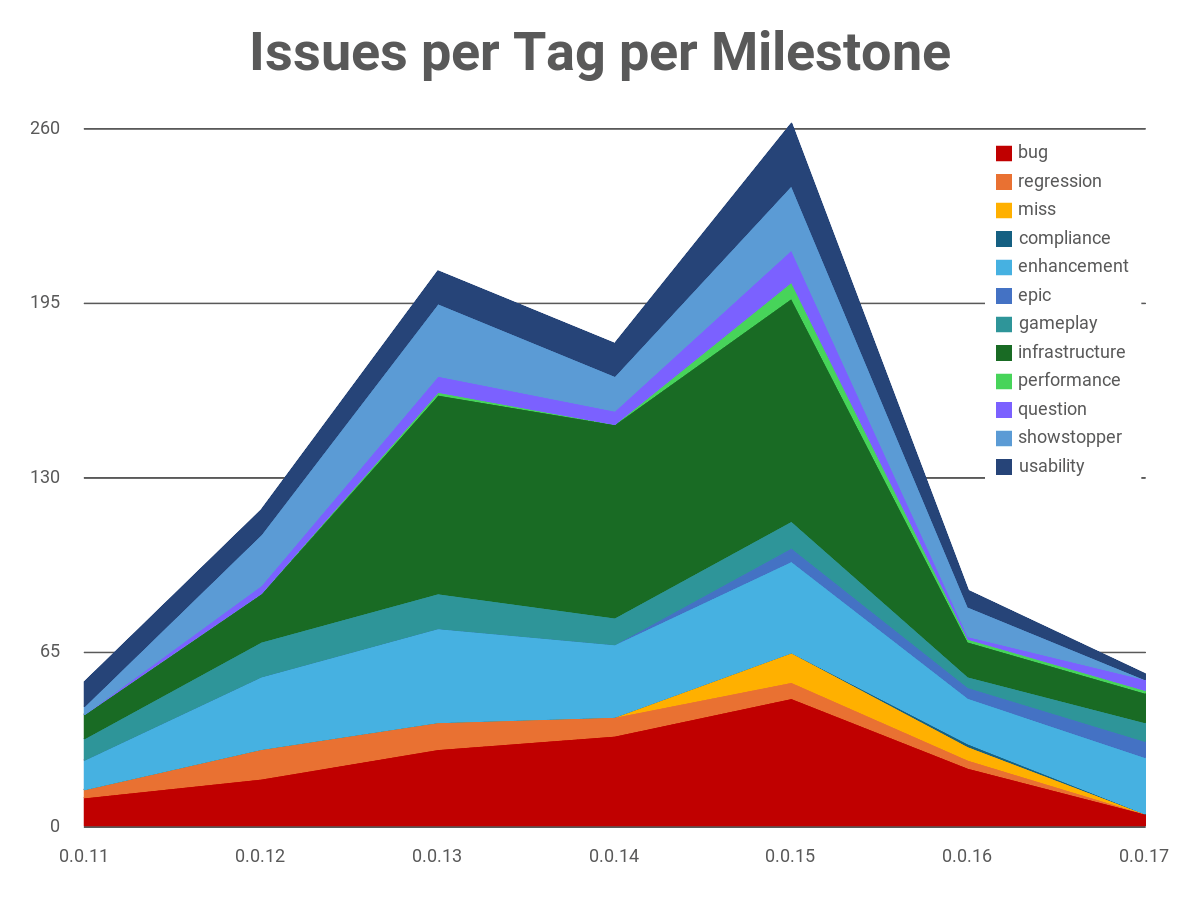
The last few posts have been heavy on the structural elements of what I’m doing and how I’m working to make LLMs work for me effectively without micromanagement, and seeing how far I can push things before that begins to come off the rails. This post is going to include a little bit of an update on the structural element, but it’s also a chance for me to show off a bit more player-facing shininess.
The game now has music and sound effects, with an infrastructure that will help me deal with a design problem that plagued me in the first two games. It also has a terrain system that doesn’t look like programmer art.
One key thing to note before I get into it: I am not using AI to produce art assets for the game, beyond a placeholder company logo and some very generic-looking placeholder UI elements. All actual art and sound in the game is human-produced.
Apparently I’m doing a series of blog posts about this project!
Part 1: Six Days Equals Six Weeks
Part 2: Specialists in the Factory
Part 3: The Invisible Work Matters
Part 4: Progress, 37 Days in
Part 5: The Meta-Game Begins
Part 6: In Which I Intervene in the Code
Part 7: Quality Requires Visibility
Part 9: A Big Win, and a Change of Pace
Part 10: Scaling Process
Roost: getting out of the supervision business
In the last-but-one post I mentioned a friend of mine who runs his agents differently than I do. Instead of a single Opus session that spawns sub-agents and babysits them, he has a bunch of independent Claude Code sessions connect to an IRC server, and supervision happens as messages in a channel. I filed that away as “something to try.”
This was the week I tried it. The setup has a name — roost — and it has reorganized how I think about the whole factory.
Here’s the problem it solves. My friend observed that when Claude spawns sub-agents, there’s a lot of needless micro-management and inter-agent chatter. In one task he observed that the actual work was on the order of 100,000 tokens but after the sub-agent completed the work, the supervisor and sub-agent burned on the order of 1,000,000 tokens discussing things. When I ran the numbers with clauditor, that sort of overhead would certainly help explain why Opus and Sonnet are roughly even for token counts.
Roost inverts it. Each worker is its own Claude Code session, sitting in a shared IRC channel. Coordination happens in the channel, as plain text, rather than inside one session’s context. I can join the channel myself and talk to any of them. They can talk to each other. Additionally, the thing doing the coordinating doesn’t need to be Opus — a cheaper model can read the room, hand out work, and keep everyone in their lane, because the hard part (the actual implementation) is happening in the workers, not the coordinator.
Roost has one channel for coordination, then one channel per issue. This helps with visibility a bit in a couple of ways: First, Claude tends to get a bit wibbly and stop updating the list of active sub-agents making it hard to actual peer into them. Second, the polling loop the supervisor was going through tended to scroll useful information off the screen fairly aggressively. If I asked it a question and then stepped away to do something else while waiting for it to answer, I’d come back to find the answer scrolled way off the screen in a very noisy stream and finding the answer was always tedious. Almost all of that polling noise stays in the dispatcher Claude session, never being vomited into the IRC channel.
By default, roost spawns an agent per issue and that agent sticks around until the PR is merged. I’ve overridden that to keep my bounded-units-of-work approach, allowing for more issues to get moved forward while still maintaining a fixed cap on simultaneous worker agents. I like waking up to a stack of PRs to acceptance-test.
It’s not free of rough edges. In particular, I’m finding it has a tendency to miss the fact that merge a merge conflict exists and needs to be resolved. It also has a known issue where some agents will just… start getting 401s when using the gh tool and that doesn’t seem to resolve without restarting everything. But. So far, it’s working well. I’m still gathering data to see if it’s resulting in lower costs or not. If nothing else, it takes some ad-hoc aspects of the process that require a degree of discipline on my part, and systematizes them.
Claudebox: Copilot-level automation, but with useful models
I’ve been leaning heavily on Copilot for code review. It produces a surprising number of valid findings when reviewing Claude code and it has the benefit that I can configure Github to summon it for review/re-review automatically. But Github raised the price a lot and its review quality isn’t great. So I started looking at GLM-5.2. What I’ve found is that GLM-5.2 is dramatically better at code review. I haven’t tried it for writing code yet, but for reviewing code it’s fantastic. It finds many more issues, in fewer rounds. The only gotcha has been automating the process.
I’m running glm-5.2 via Ollama’s cloud offering, and using their Anthropic-compatible API to drop it into Claude. The gotcha is that I don’t really trust glm-5.2 to do --permission-mode auto supervision. So I created claudebox.
There’s not a lot to claudebox. It’s a Dockerfile that sets up the Github CLI, the Claude CLI, and makes a copy of your repo as a scratch-space so you only need to mount your repo read-only. It takes a privilege-minimized Github token, an Ollama cloud token, and a path to a repo. It verifies that the Docker container came up hardened and if so, launches claude in a loop with (customizable) prompts for having it review / re-review PRs. As of today, you can even add comments addressing it and it’ll pay attention to them.
Ok. That was a lot of words about the mechanics of the process. I promised some results of the process.
Terrain: my deepest regret
Back in Part 5 I restructured how maps specify where orcs come from and where they’re going, and I dropped a parenthetical about having “much more visually complex maps in mind.” That refactor was about how maps are authored. This is about how they look.
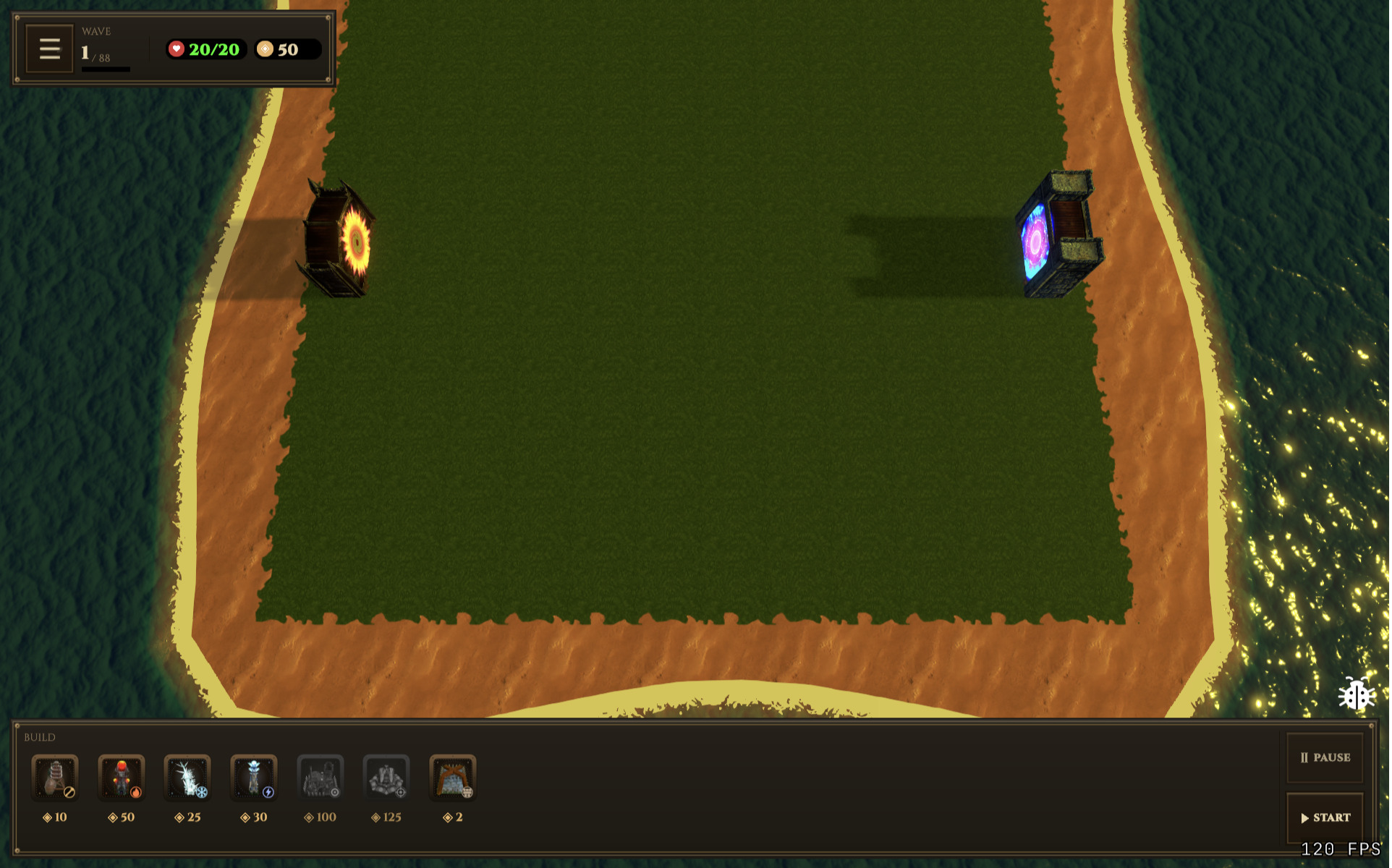
First, the before:
And now, the after:
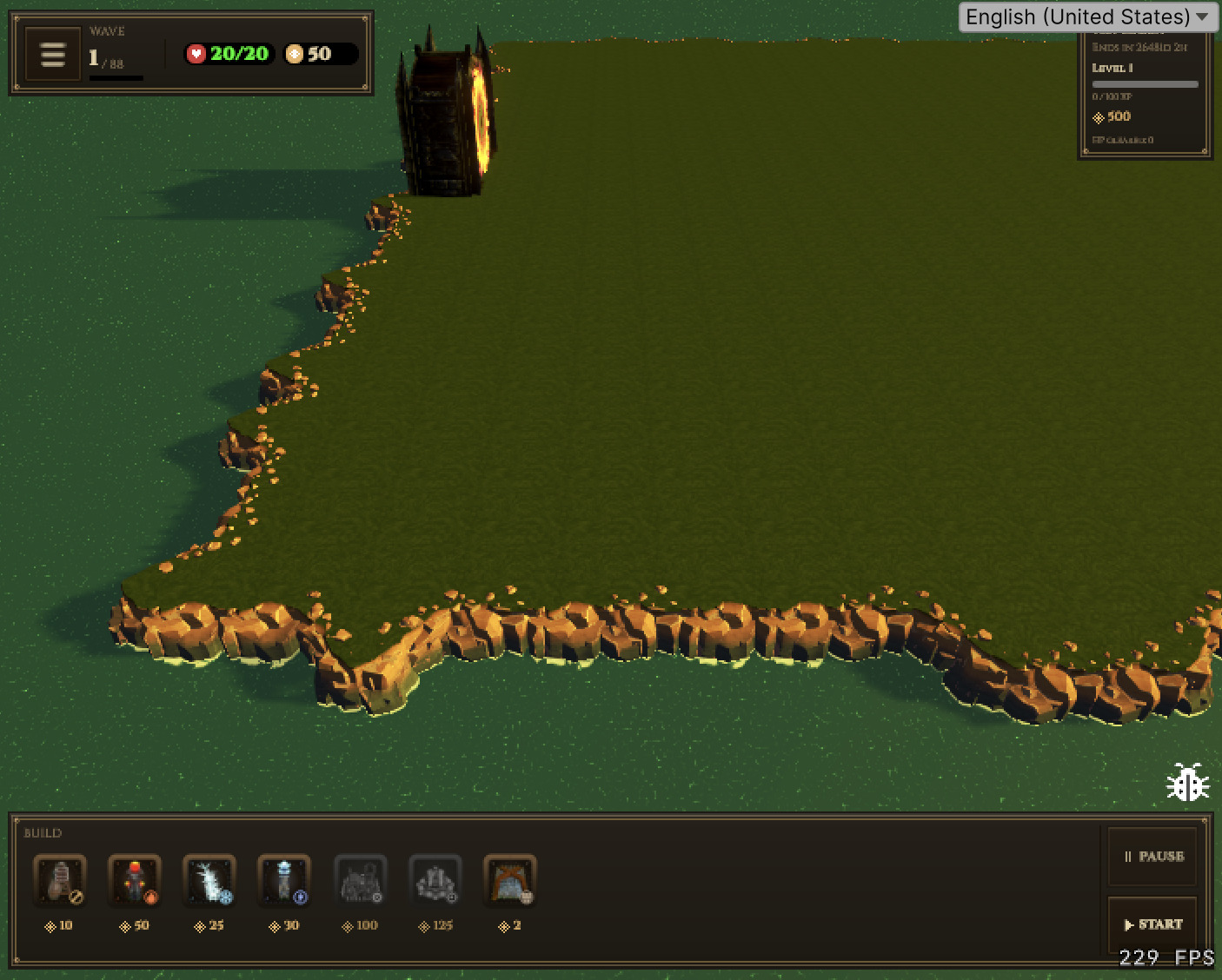
Until now, the terrain was structurally the same as what I did for the first two games in the series: Take a plane, drop the edges down, maybe add some noise to the positions / heights of a few vertices to add some roughness, and then have a water plane cut across to create a sort of “beach”. Then, blend between a base texture that represents where orcs can walk and some sort of developed/dirt texture for where buildings are placed.
In the first game, I did it for expedience and then didn’t change it because I didn’t have time. The second game, I didn’t have the budget to have an artist do something better, or the time to try and improve things myself.
Today, I have neither time nor budget! But, I do have… the Unity Asset Store. I found a fantastic tool called Tile World Creator. It’s a great little system for doing 3D tilemaps. And it even includes a tileset that works well, aesthetically, with the game.
The gotchas:
- It includes a triplanar shader system that doesn’t support bump mapping (… and does handle a bunch of other complexities I didn’t want to give up).
- The existing placement grid system was deeply tied to having a single contiguous mesh with a clear coplanar region and planar-projected UV coordinates.
So, I had the robot get to work. I gave it a clear outline of how TWC works, how I want to use it / what I expect workflow-wise, etc. I told it to hoist common PlacementGrid functionality into a base class, rename PlacementGrid to SimpleMeshPlacementGrid and draft a new TileWorldCreatorPlacementGrid class. For the “developed” / “dirt” region, I had it produce and maintain a mesh above the ground, using the same Perlin-noise-based edge-feathering as the original PlacementGrid used (although it might make sense to just make this a second tile layer, because that’s an intended TWC use-case!). Because the triplanar shader is built using Shader Graph, it walked me through what I needed to do to add bump mapping support. I mostly had it figured out, but had missed that Unity has a lerp block specifically for working with normal maps.
It can handle irregular grid structures / holes in the grid, and has parity with the old placement grid functionally. Eventually I plan on supporting multi-level grids with ramps between levels, and other nifty things TWC exposes. And, of course, I can hire an artist to come up with new tilesets.
For the first time in my game development career, I’m happy with a terrain.
Sound: the game finally has a voice
My second biggest regret with the previous games is how the sound is handled. The game is pretty challenging, aurally. You might have one or two towers, and a few orcs. You might have dozens of towers and a hundred orcs. Scaling sound effects to work with that is… challenging. One game element I added in the second game makes it even harder: The Railgun. The Railgun tower has a “charging” sound effect that plays whenever it’s not actively firing. Having a bunch of that tower in play can quickly make the game a buzzy noise generator.
I’m reusing all the sound assets from the second game, and the composer has given me a freshened-up version of the music to use. There’s still a ton of tweaking and balancing to do but this time around I was able to lean into the fundamental soundscape challenge the game design creates.
(You’ll want your volume on for this one.)
It started with a design plan. I filed an issue tagged question, that walked through all the different characteristics / features, and elaborated on the details of the scaling problem and let the robot come up with a plan. The plan was… actually pretty impressive. Priority tiers. Windowed debouncing of specific effects. Randomized pitch modulation to avoid the machine-gun effect of having the same sound effect playing in rapid succession. Ducking to dial the music back during sound effects. Instance pooling. A clear map of what compression / import settings to use for each type of sound.
The robot did get some things wrong when it went to implement it. It decided that UI sounds needed to be debounced, which led to a bug where you’d hear the click sound twice before the game menu would stop making sounds. It didn’t think to play the sound effects when using keyboard shortcuts. It wired up the wrong sound effects for orc deaths in a few cases. There’s a couple sound effects it forgot to wire up at all. There was a small game of Who’s On First related to music handling and starting a match. But that was all easy enough to correct.
The big miss, however, was around the ducking: Unity uses fmod for audio, and provides built-in support for ducking. But. Setting that up needs to be done in the editor, or via hand-crafting YAML files that were not meant for hand-editing and which Claude has historically gotten pretty wrong when it tries. So it got… proactive. It implemented a placeholder ducking system where it would just damp the music volume when playing a sound effect. Now, set aside that that’s imprecise and doesn’t sound good in this context. The bigger issue is that Claude just got it wrong in multiple ways. First, it had a fixed attack/decay window not based on the duration or aural characteristics of the particular sound effect. Second, the way it handled things is that the code to initiate a sound effect would capture the current music channel volume, and handle modulating it over the course of the sound effect playback. At the end it would restore the original volume. Of course, the moment you have a second sound effect begin while the music is fully damped, the “restore” volume becomes the damped volume. A couple sound effects in rapid succession would just permanently mute the music.
Thankfully, that was just placeholder code. I still need to get it to walk me through the in-editor wiring for ducking, but that broken code is gone.
Where the numbers stand
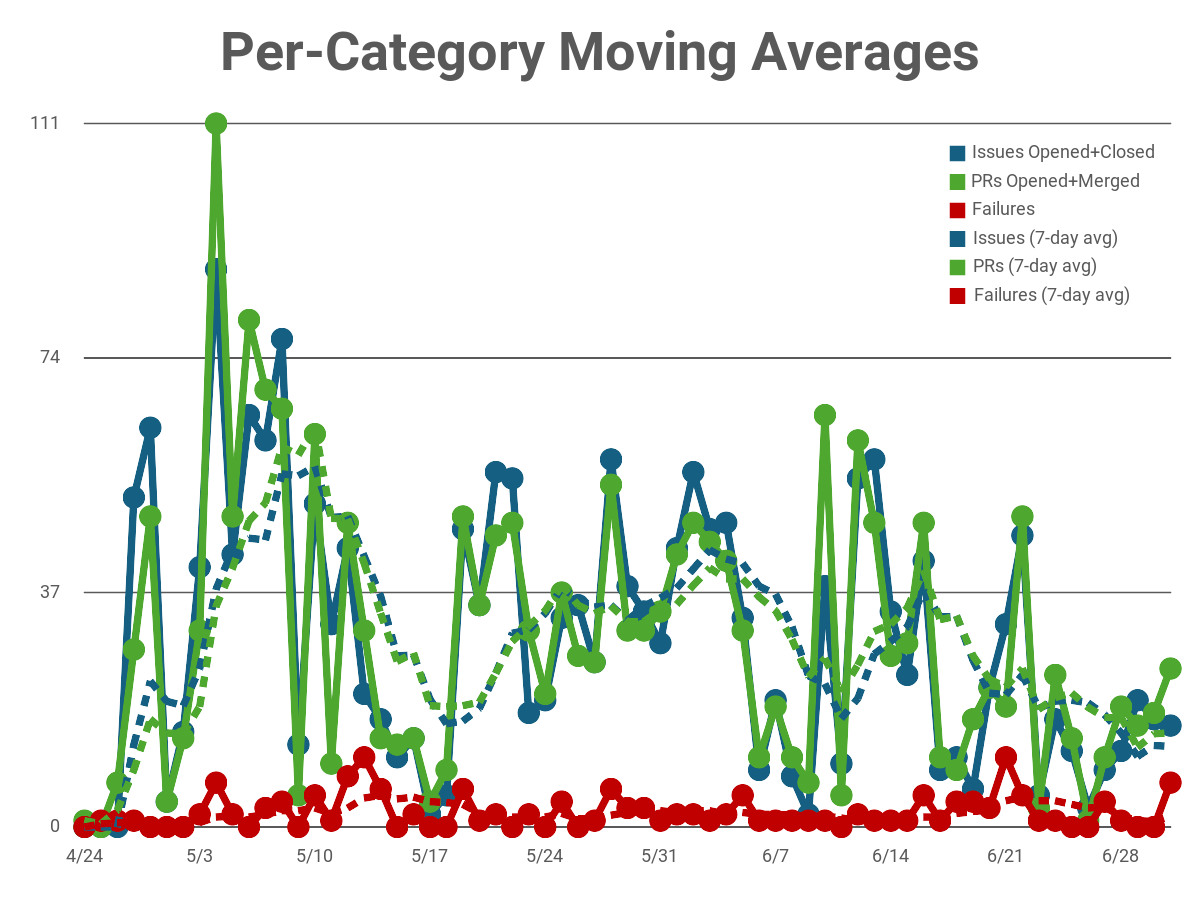
And, a new chart! Note that everything I’ve talked about here is from the 0.0.16 milestone.